Sunday, 7 October 2018

WhatsApp features huge hits coming to Android, now will be a double fun

WhatsApp features huge hits coming to Android, now will be a double fun

WhatsApp features huge hits coming to Android, now will be a double fun


WhatsApp has recently introduced a 'swipe to answer' feature in its beta Android application. Facebook's instant messaging company is constantly pushing new features and updates. According to a report, Picture-In-Picture (PIP) mode is being introduced for the video on the WhatsApp app. It is worth mentioning that this feature is available on Whatsapp Beta Android version 2.18.301.
Introducing Picture-In-Picture (PIP) mode for videos on the WhatsApp app

Users can view videos from YouTube, Facebook, Instagram only in the Chat Chat window, using PiP or Picture-In-Picture mode. That means you can now watch videos with a chat. This feature will be more useful when you link to any videos on WhatsApp. By clicking on the video link, you will be able to watch the video in picture-in-picture mode.

Make Money From Modi Government's Solar App

Make Money From Modi Government's Solar App

Make Money From Modi Government's Solar App


Modi government is getting the opportunity to make a profit by installing a solar plant. Yes, the government has launched a mobile app. You can start Solar Power business after downloading it on a smart phone.
Read also: 9 special savings plans in post office, know how much interest will be available
Not only this, if you want to reduce the lightbulb besides business, this mobile app will make your work easier. Let's say that the Ministry of New and Renewable Energy MNRE has prepared this app. The government has named this app as the Atal Rooftop Soul User Navigator (Arun).

What is Arun App?

If you want to plant a solar plant on the roof of your home, you can download your Android app to 'Arun' app. The Mobile App National Informatics Center (NIC) has developed. This app can also be downloaded from the official website mnre.gov.in and solarrooftop.gov.in

Is beneficial

However, if you open an app by downloading a mobile app, you will first get basic information. For example, a solar power plant can generate 1 kilowatt power from the 10 square meter solar plant, or 150 units of electricity can be generated in the month. Along with this, basic information about the plant's Benchmark Cost, Subsidy, Bank Loan etc. is also provided.

Monday, 1 October 2018

9 special savings plans in post office, know how much interest will be available

9 special savings plans in post office, know how much interest will be available

Post offices in the country have the facility of opening different types of savings accounts. There are about 9 types of savings schemes going on in the post office. According to India Post's website indiapost.gov.in, the post office offers interest ranging from 4% to 8.3% on the savings scheme. The post office savings scheme includes recurring deposits, fixed deposits, monthly income plans, senior citizen savings plans, public provident fund accounts of 15 years, national savings certificate, Kisan Vikas Patra and Sukanya Prosperity accounts, which yield interest ranging from 6.6% to 8.3% May be.

Post Office Fixed Deposit
This savings scheme can be invested in four types of tenure, one year, two years, three years and five years. Interest on one year FD is 6.6%. Interest rate is 6.7% for two year FD. The interest rate on the three-year FD is 6.9% and the interest on the five-year FD is 7.4%. There is also relaxation in income tax act 80C on a five-year FD.

Recurring Deposit
Investing in recurring deposits can be done with a small amount of Rs 10 per month. This account receives an interest rate of 6.9 percent on the deposits. This savings scheme also has the facility of raising 50% of the money a year later.

15-year-old public provident fund
This account can also be invested by 100 rupees. In which, investment up to a maximum of one lakh rupees is benefitted in a financial year. It earns interest at the rate of 7.6 percent. The account holders can deposit at least 500 and a maximum of 1.50 lakhs in a financial year. The Maturity Period of this account is 15 years old

Specially for SBI customers, now you can not withdraw more than 20 thousand rupees

Specially for SBI customers, now you can not withdraw more than 20 thousand rupees

SBI has made an important decision considering the fraud due to ATM card. India's largest public sector bank State Bank of India is going to reduce the limit of withdrawal of ATMs from ATMs. The bank will reduce this limit to half. So far, you could raise up to 40 thousand rupees in a day, but after October 31, you will only get Rs 20 thousand.

A statement issued by the bank said that the decision has been taken to cheat on ATMs, complaints received by banks and increase digital. It has been decided to reduce the limit of people who have a debit card with a classic and Mastro platform

Fraud victims in ATMs often become classic card holders. The restrictions on cash withdrawal are coming before the festivals. Let's say that some merchants are using some merchant mobile swipe machines on outlets. Some people are still using a debit card, in which there is a magnetic strip. The possibility of fraud like this type of card is increasing. Credit cards growth of some big banks is being increased by a small city and top 10 cardholders from outside the city are contributing 40-45% of the costs incurred.

Tuesday, 24 July 2018

1000 Rupees, Not Just Rs 250 Fulfill Your Child's Future By Filling Up, A Major Change In The Modi Government In The Sukanya Prosperity Scheme

1000 Rupees, Not Just Rs 250 Fulfill Your Child's Future By Filling Up, A Major Change In The Modi Government In The Sukanya Prosperity Scheme


The Government of Gujarat launched the Sukanya Samrudhi scheme in 2015 to ensure that there is no financial constraint for high school children and marriage. To start the account at the beginning, you had to deposit 1000 rupees. Now the Modi government has changed the rules of this plan. Now this account can be opened only from 250 rupees. The government rewards the interest rate received in the plan every three months. Its interest rate was fixed at 8.1% in the July-September quarter.

What is special

- In the name of the child, parents can start this account from birth to 10 years
Only one account can be opened on the name of a daughter. And parents can only open up to two accounts.

- This account can be opened in the post office and bank.
- In order to open the account, birth certificates, identification proof and resident proof will be deposited.
- Minimum amount of 250 rupees is required to be deposited every year.
Deposits of up to Rs 1.5 lakh can be deposited in a year. Money can be enjoyed every single month or year at the same time.
- Deposits will be deposited for 14 years from the date of opening the account.
- The closing account can also be opened by paying a penalty of 50 rupees per year.
- This loan can not be taken by this account.

Take care of these things

- After 21 years the account will be closed and the amount will be available to the Guardian. If the daughter's marriage breaks between 18 and 21 years then the account will be closed from the same time. If the premium is credited, then a penalty of 50 rupees is considered. The guardian can open his own two-child account.

- A third account can be opened by giving proof of it on twins. You can also transfer the account to For example, in 2018, if someone opens an account with 1,000 rupees per month, then it will have to deposit 12 thousand rupees every year for 14 years or 2031. 1.68 lakhs will be deposited in 14 years. The interest rate for this scheme is 8.1% in 2018. At this rate, the girl gets deposited Rs 527,036.12 in the account of 21 years of age.

Read this news::-click here

Monday, 23 July 2018

How to find vehicle owner detail

How to find vehicle owner detail

How to find vehicle owner detail


When you are buying used vehicle, app will help you to find our current owner of the vehicle and how old the vehicle is. This app will provide vehicle registration details like owner name, fuel type, registration date, and much more like chassis number and engine number.
Verify your vehicle registration details. If owner details are not accurate then change it immediately with vahan RTO india.

This application will help a traveller or passenger in many ways and even in the case of police investigation of an accident or vehicle-related crime, witnesses usually remember the initial area code letters it is then quite simple to narrow down suspect vehicles to a much smaller number by checking the app without having to know the full number.
rto registration number verification is also required during the sale of a vehicle and transfer of its ownership.
Also this application usefull as Vehicle info tracker to find your own city, state vehicle registration details in a picnic or a tour spot.

Hear the drivers, the Supreme Court gave a third party insurance verdict

Hear the drivers, the Supreme Court gave a third party insurance verdict

Hear the drivers, the Supreme Court gave a third party insurance verdict


Supreme Court has ordered the road accident, now it is mandatory to register third party insurance for new vehicles. The Supreme Court has mandated third-party insurance of 3 years at the time of registering the thief wheeler from September 1, and mandatory 5-year third party insurance for the two-wheeler.


The Supreme Court said to a committee that "Third-party insurance of two-wheeler and thief-wheelser should be made in order to compensate the victims of road crashes, and at the same time, insurance companies will have to look at the space of interest." The


court said that in India More than 1 lakh people die each year in road mishaps. The Symphishing Committee, headed by former Supreme Court judge KS Radhakrishnan, will make third party insurance inadequate for three or five years at the age of one year at the sale of a two wheeler and a four wheeler.


," he said Back, he said, "Insurance companies should look at this issue in a human way, neither from the perspective of the business interests, Cover 2-3 times a week See people in India who are dying in the road accident and getting no relief because insurance companies are spending a lot of time.
Read the original source

Sunday, 22 July 2018

HOW TO FILING ONLINE ITR FOR AY 2018-19

HOW TO FILING ONLINE ITR FOR AY 2018-19

HOW TO FILING ONLINE ITR FOR AY 2018-19


The Central Board of Direct Taxes has notified the new ITR Forms for AY 2018-19 Income Tax Return Filing (for FY 2017-18). In order to make ITR filing easy, some sections of the forms have been rationalized.
The new ITR forms in PDF format have been made available, while the excel utilities (or) Java Utilities for AY 2018-19 will soon be made available on incometaxindia e-filing website.
What is Assessment Year (AY) & Financial Year (FY)?
Financial year (FY) is the year in which you have earned the income. If you are filing a return this year, the financial year will be 2017-18.
For example, if you have had an income between 1st April 2017 and 31 March 2018, then 2017-18 will be referred to as FY. Assessment Year (AY) is the year in which you file returns i.e., 2018-19. The last date to file returns for the financial year 2017-2018 is July 31st 2018 (as of now).
  • Income Tax Slab Rates for FY 2017-18
The income tax slabs & rates are categorized as below;
Individual resident aged below 60 years.
Senior Citizen (Individual resident who is of the age of 60 years or more but below the age of 80 years at any time  during the previous year) &.
Super Senior Citizen (Individual resident who is of the age of 80 years or more at any time during the previous year).
AY 2018-19 Income Tax Return Filing | New ITR Forms
Below are the important details about new ITR forms;
The requirement of furnishing details of cash deposit made during a specified period as provided in ITR Form for the Assessment Year 2017-18 has been done away with from Assessment Year 2018-19.
NRIs can now provide details of their foreign bank accounts to claim credit or refunds. Earlier, they could only provide details of bank accounts held in India.
However, NRIs will no longer be able to file returns using the simple income tax return (ITR)-1 form, which can now only be used by residents. NRIs will have to use ITR-2, which seeks more information.
GSTIN number now has to be mentioned in ITR-4 filled by businesses and professionals claiming presumptive income. They also have to quote gross receipts as per GST returns.
The partners in firms will now have to file ITR-3 instead of ITR-2.
All the ITR Forms are to be filed electronically. However, where return is furnished in ITR Form-1 (Sahaj) or ITR-4 (Sugam), the following persons have an option to file return in paper form:-
An Individual of the age of 80 years or more at any time during the previous year (or)
An Individual or HUF whose income does not exceed five lakh rupees and who has not claimed any refund in the Return of Income.
FY 2017-18 Income Tax Return Filing | Which ITR form to file?
New ITR 1 (Sahaj) Form For Assessment Year 2018-19
The Central Board of Direct Taxes(CBDT) has notified Income Tax Return Forms (ITR Forms) for the Assessment Year 2018-19. For Assessment Year 2017-18, a one page simplified ITR Form-1 (Sahaj) was notified. This initiative benefited around 3 crore taxpayers, who have filed their return in this simplified Form. For Assessment Year 2018-19 also, a one page simplified ITR Form-1(Sahaj) has been notified.
This form can be used if you have;
Salary or Pension Income
Income from one house property (excluding cases where loss is brought forward from previous years)
No business income / no Capital gains
No asset in foreign country or no income from a source outside India
Agricultural  income which is less than Rs 5,000
Income from other sources like FD/Shares/NSC etc.,
No income from lottery or horse racing.TR Form-1 (Sahaj) can be filed by an individual who is resident other than not ordinarily resident, having income upto Rs 50 lakh and who is receiving income from salary, one house property / other income (interest etc.).
Further, the parts relating to salary and house property have been rationalized and furnishing of basic details of salary (as available in Form 16) and income from house property have been mandated.

  • New ITR 2 Form for Assessment year 2018-19 :
 ITR2 form can be filed by an Individual or Hindu Undivided Family (HUF). This form can be used if you have;
 Salary or Pension Income
 Income under the head ‘Capital Gains’
 Income from multiple houses
 No business / professional income under any proprietorship
 An asset in foreign country or income from a source outside India
Agricultural income of more than Rs 5,000
Income from lottery or horse racing
If your income is more than Rs 50 Lakh, ITR 2 has a Schedule AL requiring assessees to declare their assets and liabilities at the end of the fiscal.
Click here to download new ITR 2 Form.
New ITR 3 for AY 2018-19 Income tax filing
Since AY 2017-18, the previous ITR 4 form has been re-numbered as ITR 3 form.
New ITR 3 form is for individuals and HUFs having income from a proprietary business or profession (or having income as a partner in a Partnership firm).
This ITR covers all kind of businesses and professions irrespective of any income limit. Assesse can also report his income from salary, multiple house properties, lottery winnings, capital gains, speculative income i.e. horse race in ITR3 together with the Business Income.
Click here to download new ITR 3 Form.
New ITR 4S (Sugam) form for AY 2018-19 / FY 2017-18
This form can be used by individuals who have;
Presumptive income from Business or Profession.
No Capital Gains
Agricultural Income which is less than Rs 5k
No asset in foreign country or no income from a source outside India
Income from one house property
Income from other sources
Click here to download new ITR 4S form.
Important points to consider before filing your ITR :
Before you file your Income Tax returns, check if your Form 26 AS has correct TDS entries. For example: Your employer might have deducted TDS amount for last quarter and deposited the amount on your behalf. Check for this transaction in Form 26 AS. Also, check whether all the investments with TDS have been duly mentioned in your Tax return form also. Any mismatch will lead to a notice from the department.
Do not file your ITR till you get Form-16 (issued by your employer, if salaried) and Form 16A. While Form 16 is for only salary income, Form 16A is applicable for TDS on Income Other than Salary. Form 16A is a statement containing all details of TDS Deducted on all Payments except Salary. For example,  Form 16A is issued by banks when they deduct TDS on interest income earned on your Fixed Deposits / Recurring Deposits.
Form16, Form 16A and Form 26AS documents will come handy while filing your ITR. As discussed above, you have most of the details in your form 16 with which you can easily file your Tax Returns. Cross check your Form 16/16A TDS amounts with Form 26AS and then key in TDS details in ITR accordingly.
Based on Form 16, you can fill ‘Income’ and ‘TDS’ details. By looking at your Form 16 A, you can fill ‘income from other sources’ and ‘TDS’ details in ITR sheet.
Based on Form26 AS, you can cross check the above TDS payments and also fill in details of ‘Advance or self assessment tax’ payments (if any) in your ITR sheet. (Related Article : ‘Understanding your Form 16 & other Tax related forms – Form 16A & Form 26AS‘)
 If you had joined a new company during the financial year then do not forget to declare the income from previous employer in the tax return.
You might have earned interest income on Bank fixed deposits, Bonds, National Saving Certificates (NSCs) etc., This income is taxable. (Interest earned on bank savings account is exempted upto Rs 10,000 but it should be included in filing). You have to declare all these incomes in your tax return.
In case, if your declared investment amount (to your employer) is more than your actual investments, you have to pay additional taxes while filing your Income Tax Return
In case, if your declared amount is less than your actual investments, your company might have deducted higher TDS. So, you can claim this as ‘refund‘ while filing your taxes. (Kindly read : ‘TDS & Misconceptions‘)
Even if you miss the deadline for submitting the investment proofs, you can still claim all the tax deductions (except few allowances like LTA or Medical allowance) while filing your Income Tax Return.
It is advisable to keep copies of all your original documents for your future reference.

Important Link :


31st July is the last day to file your income tax returns this financial year, 2018-19. Nothing proves your financial wisdom and ethics like tax compliance – timely filing of ITR. Filing your income tax return is not as difficult as it may sound. Here is a step by step guide to e-file your income tax return using ClearTax. It is simple, easy and quick.


  • Step 1: ITR  Efiling – Getting Started

Before we get started, you should have the following documents at hand to pace up the process:

PAN
Adhaar
Bank account details
Form 16
Investments details
Login to your ClearTax account.

Click on ‘Upload Form 16 PDF’ if you have your Form 16 in PDF format. If you do not have Form 16 in PDF format click on ‘Continue Here’

  • Step 2: Enter Your Personal Information

Enter your name, PAN, Date of birth and father’s name.

image6


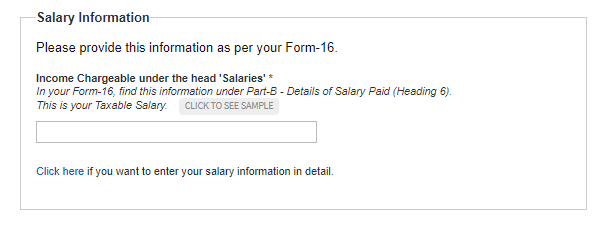
  • Step 3: Enter Your Salary Details

3a. Fill in your employer name and type.

3b. Provide your salary and TDS information. For entering the break up of your salary in detail ‘Click here’.

image8
image1
image5

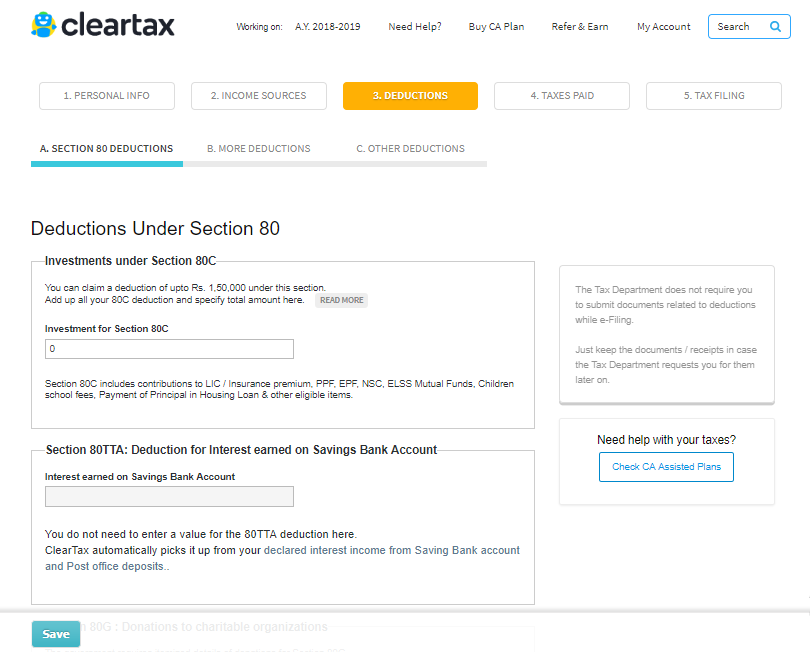
  • Step 4: Enter the Details for Claiming Deduction

Enter investment details for deductions to be claimed (eg. LIC, PPF etc., and claim other tax benefits here.
image3

  • Step 5: Enter the Details of Taxes Paid

If you have any non-salary income, say, interest income or freelance income, then add tax payments that are already made. You can also add these details by uploading Form 26AS.
image7

  • Step 6: e-File

Enter your bank account details and proceed towards e-filing.

If you see ‘Refund’ or ‘No Tax Due’ here, Click on proceed to e-Filing. You will get an acknowledgment number on the next screen.

Tip: See a ‘Tax Due’ message? Read this guide to know how to pay your tax dues.
image10

  • Step 7: E-Verify

Once your return is filed e-Verify your income tax return.

Watch this video to know how to e-File ITR Online

Yay! You Are Done

IMP POST: ELECTION CARD,RATION CARD,PAN CARD,AADHAR CARD ALL DETAIL IN ONE POSTS

IMP POST: ELECTION CARD,RATION CARD,PAN CARD,AADHAR CARD ALL DETAIL IN ONE POSTS

IMP POST: ELECTION CARD,RATION CARD,PAN CARD,AADHAR CARD ALL DETAIL IN ONE POSTS


(2) Find

your name and card number online. Choose your district, taluka and
village after clicking Go on the following link. Then click on the number of ration cards will show a list of the entire village. Click
below.
(3) Learn


Aadhaar cards Status. You have Aadhaar cards kadhavyu from your nearest
place to reach even by post at home. If you do not know what has become
of Aadhaar cards. This allows you to see who will receive the
registration number 14 Stats. Click below.
(4) Aadhaar

cards to link with the gas connection of the bank will give you a copy.
Do you know whether there was a link, click on the following link. You
will see the number of Aadhaar cards.
(5) Know your pan card status. if pan card approved?


Wednesday, 13 June 2018

Check whether the gas subsidy money was deposited in the bank account

Check whether the gas subsidy money was deposited in the bank account
Many of you would be that the cooking gas cylinders would be subsidizing them. Under the subsidy scheme, customers get a cooking gas cylinder at a fixed price and afterwards some amount is withdrawn in the bank account as subsidy.

Problems occur when we do not know whether money is coming in our account or not, how many are coming? Let's tell you one way to let us know today.

First of all, write www.mylpg.in in the smartphone browser. Now you will get gas companies names on the left, click on their service provider's name. You will then be asked for an LPG ID and a registered mobile number. After doing okay you will have to pay fiscal year such as 2016-17 or 2017 18. You will then be able to get subsidi

You will get the information about when the amount of subsidy was placed in your account. If you do not get subsidy money in your account, you can complain by clicking the Feedback button.

If you link your LPG ID to the account ...

Sunday, 10 June 2018

DOWNLOAD MOBILE CALLER LOCATION TRACKER APPLICATION

DOWNLOAD MOBILE CALLER LOCATION TRACKER APPLICATION

DOWNLOAD MOBILE CALLER LOCATION TRACKER APPLICATION

Mobile
Caller Location Tracker helps you to Search and Track Mobile Number
,STD code and ISD code without internet connection, it will display
location of caller with service providers name, with City, State
information on every incoming and outgoing calls.

— Key FEATURES —

  • ✔Track any Mobile number from overall INDIA,USA,CANADA ,PAKISTAN and view Location on Map.
  • ✔ Block Calls from unwanted mobile phone numbers & Callers.
  • ✔ Find STD Code, ISD Code.
  • [AdSense-C]
  • ✔ No Internet connection required for Caller ID
  • ✔ internet connection required for show location on Google map.
  • ✔ Locate phone number,operator details, area and state.
  • ✔ Shows Caller Information during incoming and outgoing calls.
  • ✔ View list of your Contacts with Area and operator name.
  • ✔Caller Location Tracker app is completely offline.
  • ✔ View list of your Call Logs with Area and operator name.
  • ✔ Caller ID – Helps you identify who’s calling before answering.
  • ✔ Simple and Best Caller Location app for your Android device.
  • ✔ Easily Track Caller Location with this app.
  • ✔ Free Caller Location app for your Android.
  • ✔ Mobile Location Tracker is a easy and Graphical based user interface which acts as it says.
  • ✔ Tracker Location of any Mobile number in India USA Canada..etc
  • ✔ Caller Location Tracker app is completely offline. Note:
  • This application will not show the actual physical location/GPS
  • location of the caller. All location information is at State/City level only.

IMPORTANT LINK